Every Docking, Measured: How Marfle Tracks Impact at the Turbine
Joose Viljanen
••4 mins
Every hard hit, found and dated
A crew transfer vessel lands on a turbine tower every working day, often several times. Most of those landings are routine. A few are not. Hard hits add up as fatigue in the structure over the tower's lifetime. And when the charter contract sets a limit for landing impacts, the operator who knows their numbers is the one in control.
The problem is that hard hits are easy to miss. They sit in one day's log among dozens of normal landings, and nobody can open every day of a season to look for them.
Marfle Fleet Analytics measures the impact of every docking and shows it where you need it: in the single landing, on the vessel's motion timeline and across a full month or season.
Questions every CTV operator has to answer
Fleet managers and their charterers keep asking the same things:
- Which dockings hit the tower hardest, and where?
- Is this vessel's impact severity going up or down?
- How many landings went over the charterer's limit?
- Is the crew's approach technique improving?
Answering them needs numbers. A master's experience is strongest when the data backs it up.
How the measurement works
The Marfle main unit and motion sensor on board record every docking automatically. The crew does not log anything by hand.
Impact is shown in kilonewtons (kN), so it compares directly with the limits charterers set for boat landing impacts. Every view shows the same figure, from the single landing to the seasonal report.
One figure, three views
The single docking: Operations tab and daily report
Every docking of the day is listed with its target asset and impact force, alongside heave, docking score, duration, push fuel, wind and wave height. Fleet managers see right away which landing stood out and in which conditions. The same table arrives in the daily report PDF in their inbox. One click on a docking opens it on the Track page.

The moment of the hit: Track page motion graph
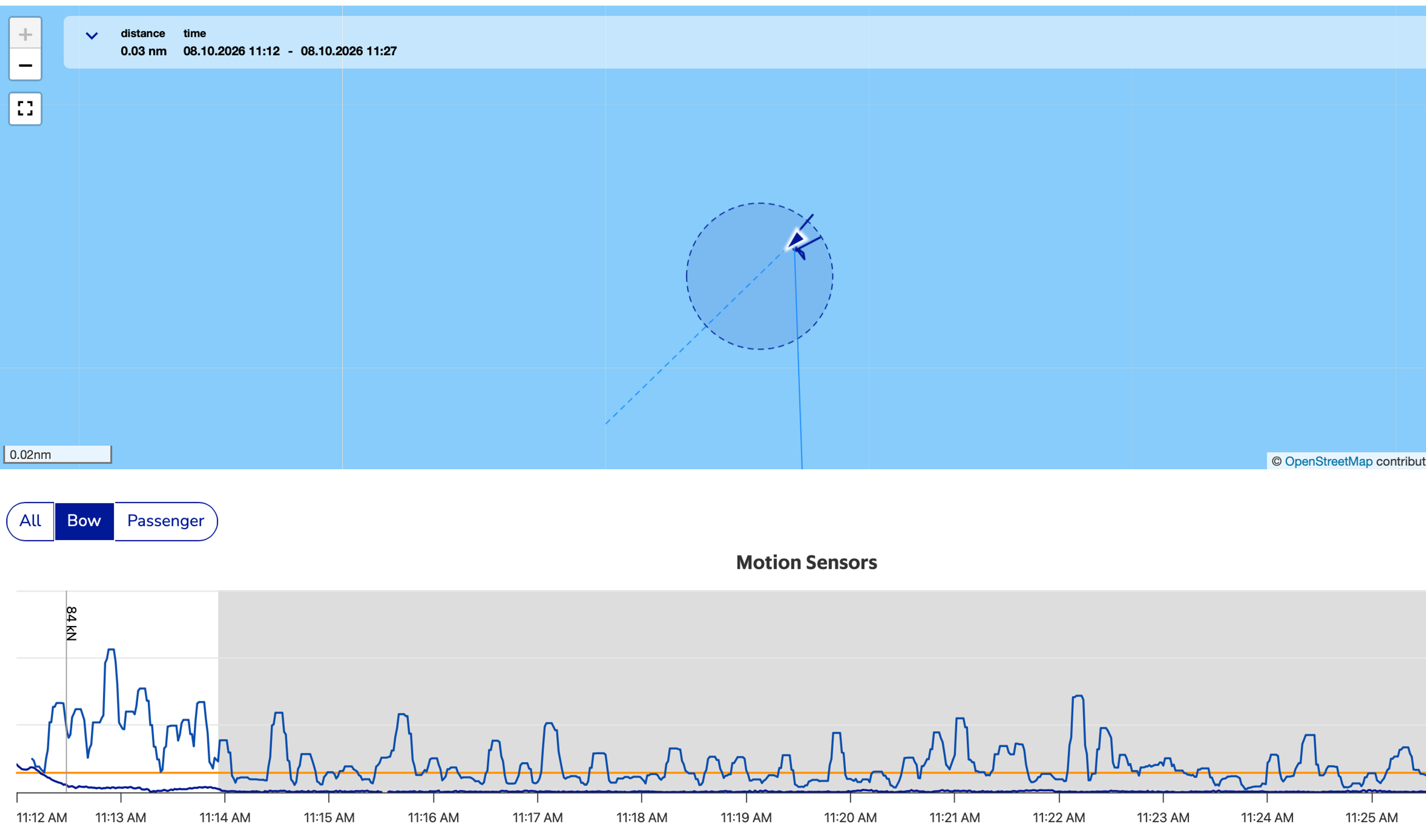
On the Track page, each impact appears as an event on the motion graph: a vertical line labelled with its kN value. You see how the vessel moved in the seconds before and after it met the tower, which turns one number into a story the crew can learn from.
You do not have to wait for the report to hear about a hard hit. Marfle can send an SMS alert the moment a docking impact exceeds the limit you set, so the office knows about it while the vessel is still in the field.
The full picture: Report tab and monthly report
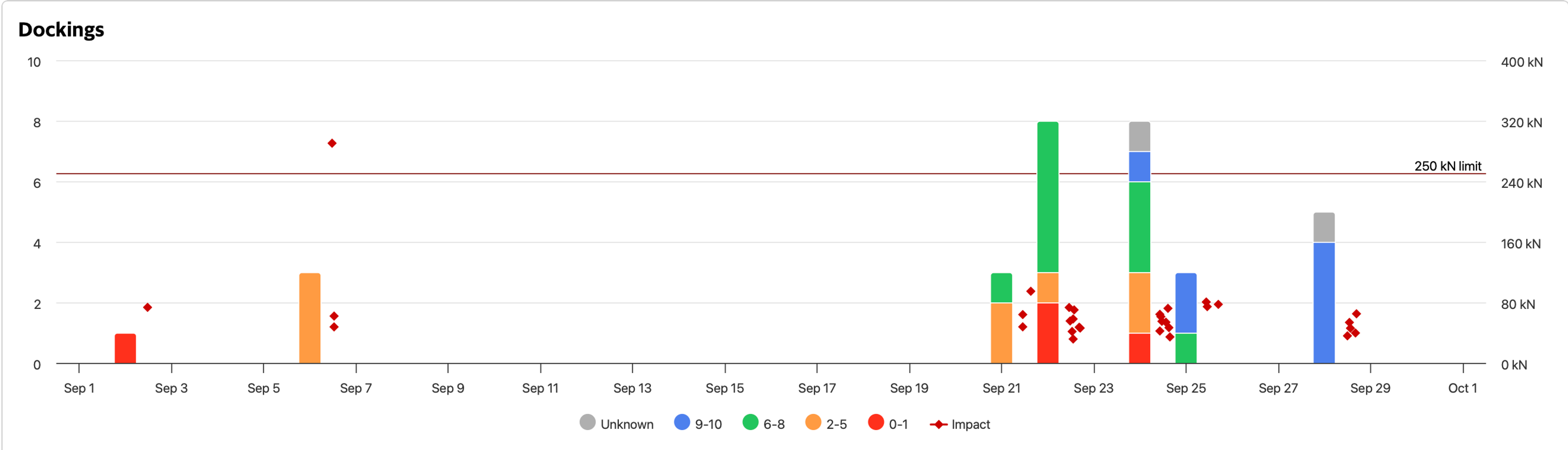
The new Docking Impact Overview plots every impact for a vessel over any period you choose: a month, a season or a year. Each docking is one point, laid over the familiar dockings-per-day bars. A 250 kN reference line, a limit charterers commonly set, runs across the chart, so anything above it stands out right away.
Hover over a point to see the vessel, time and force. Click it to open that day's Operations view. The same chart is in the monthly report PDF, so the picture reaches every subscriber without anyone logging in.
Why it matters
Protect the asset. Tower and bow damage comes from hits you can now see, count and date. Spot a pattern early, before it becomes a repair bill.
Keep the crew steady. A hard hit is felt by everyone on board, from the wheelhouse to the technicians waiting in the cabin. Fewer hard landings mean a calmer, safer ride for crew and passengers alike.
Coach the crew. Compare months, vessels and masters. Talk about approach technique with real numbers instead of impressions.
Share with confidence. Know your own numbers first and fix issues within your team. When you are ready, give your charterer the same view: a user account in Marfle or the monthly report in their inbox. What they see is the real data, not a filtered version. We believe transparency works for both sides. The charterer gets facts instead of assumptions, and the operator gets a record of controlled dockings that speaks for itself in every review and every tender.
Run smarter at every docking
Docking impact is available on vessels with the Marfle main unit and motion sensor, as part of Marfle Fleet Analytics. Book a demo to see your own dockings, from a single hit to a full season.
Find out more at marfle.com/solution.

About the author
Joose Viljanen
Joose Viljanen is the Managing Director of Marfle. He works directly with fleet operators in offshore wind, pilotage, towage and other demanding marine segments, helping them turn vessel and engine data into safer, more efficient operations.
Keep reading
 Joose Viljanen
How Tidal Transit Leveraged Marfle to Optimise Maneuvering, Reduce Fuel Costs and Deliver Safer Offshore Transfers
How a North Sea CTV operator uses Marfle Fleet Analytics to cut fuel costs, automate reporting and prove transfer quality to wind farm clients.
 Ana Rosa
How Techno Dive Improved Vessel Performance and Fleet Transparency with Marfle Fleet Analytics
Techno Dive enhanced vessel performance and fuel efficiency with Marfle, gaining real-time operational visibility, reducing emissions, and supporting long-term competitiveness.
 Juha Männikkö & Ana Rosa
How Cory Group Prevented Unplanned Engine Shutdowns with Real-Time Fuel Pressure Monitoring
Discover how Cory Group achieved earlier fault detection, proactive maintenance and greater fleet reliability using Marfle’s Low Fuel Pressure Alert.